
Sales ReportUpdated 5 months ago
Head to the Home page in the dashboard and click Sales Report.
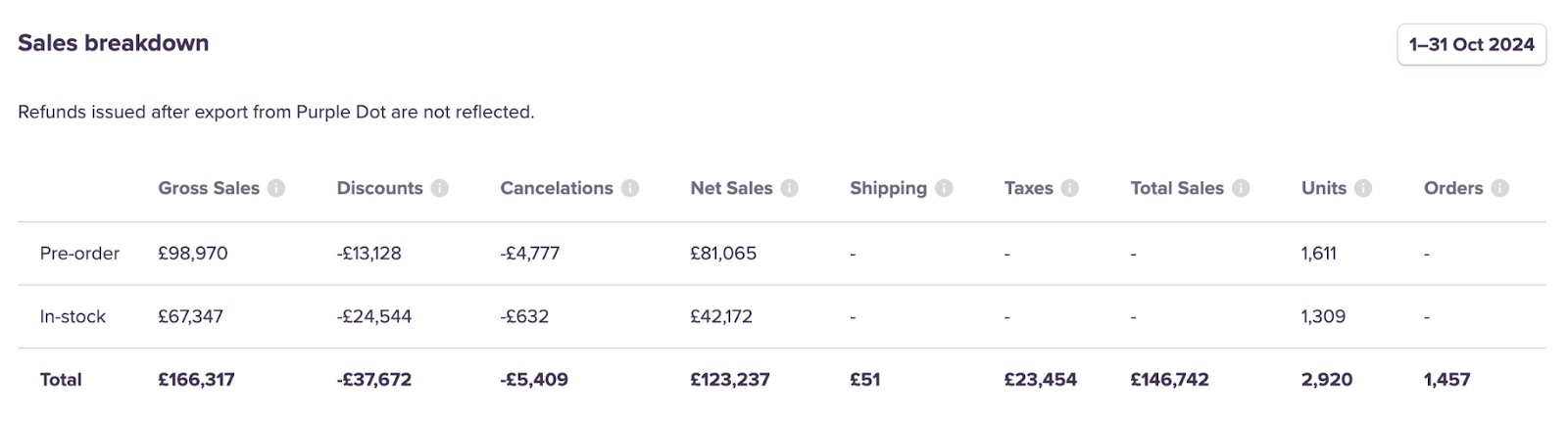
You can now see the breakdown of your pre-order sales, as well as any in-stock units that were bought alongside those pre-orders. Key metrics include:
Gross Sales: Value of all line-items (excluding taxes, shipping and discounts)
Discounts: Line-item discounts (excluding tax and shipping discounts)
Cancelations: Value of canceled line-items (after discounts, excluding tax)
Net Sales: Gross Sales - Discounts - Cancellations
Shipping: Shipping charges (after shipping discounts and cancelations, before taxes)
Taxes: Value of all line-item and shipping taxes (after cancelations and discounts)
Total sales: Net Sales + Shipping + Taxes
Units: Count of line-items (after cancelations)
Orders: Count of pre-orders (after cancelations)
What else should I know?
- Any refunds issued after an order has been exported are not reflected in the report.
- Cancelations are included based on the date the cancelation took place, not the date the order was placed. In some scenarios, this could lead to a negative Net Sales figure in the report.
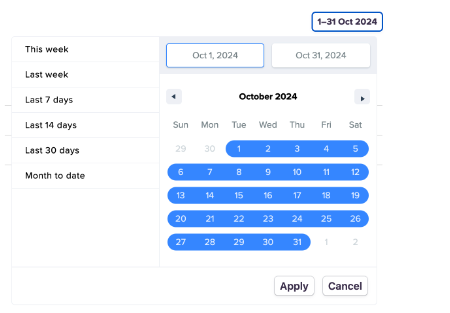
- You can filter the dates for the shown data on the right-hand side:
Comparing Purple Dot's Sales Report to Shopify's
You may see some differences when comparing sales in Purple Dot to figures in Shopify. This is due to the timing of when orders are created in Purple Dot compared to when they’re created in Shopify:
Sales in Purple Dot reflect when a pre-order was originally placed
Sales in Shopify reflect when a pre-order is exported (ie ready to ship)
For example:
If a customer made a pre-order on September 20, this order is then exported on October 2nd. This sale will be included in September’s sales report in Purple Dot and October’s report in Shopify.