
Only one pre-order item is ready to be exported, can I split the pre-orders?Updated 5 months ago
You can export individual line items even if the entire order hasn't arrived!
If you manually export your waitlists
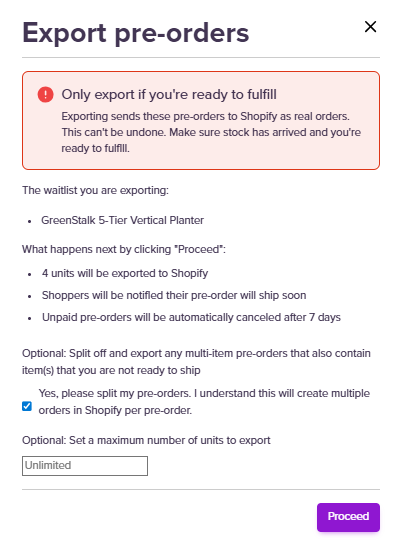
You will now see a tick box when you follow your usual exporting process:
If you manually export individual orders
You can also manually export individual line items to Shopify. To do this, find the pre-order and click 'Export pre-order to Shopify'. You'll then be prompted to choose the line items you'd like to export.
If you use our Automation export functionality
If you want to always export individual pre-order items as stock becomes available and use automation, you can use this feature:
Head to Settings on the left-hand side of your dashboard. Then click Operations and scroll down until you find Export Settings
From here, you can select: Split with partial exports